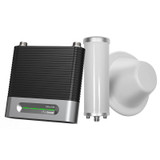
There are two major considerations on whether or not to buy the weBoost Office 100 50 Ohm Yagi/Panel. This booster works best for small businesses. The effective coverage area will vary depending on the strength of your OUTSIDE signal, so it's important to understand – if you’re expecting 8,000 square feet of coverage but have only one bar outside your building, you won’t get it. Realistic expectations of coverage in that scenario are more like 2,000 to 3,500 square feet.
The other major consideration is whether you’d prefer to install it yourself or have someone do it for you. The weBoost Office 100 50 Ohm Yagi/Panel is a DIY kit, which means you’ll be installing this booster yourself. This includes finding the cell tower you want to target and aiming the outdoor antenna.
The difference between the two Office 100 50 Ohm kits is the included antennas.
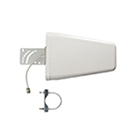
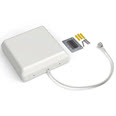
The Office 100 50 Ohm Yagi/Panel is kitted with an outdoor yagi antenna and an indoor panel antenna. Due to these antennas’ characteristics, this kit is best for small businesses far from cell towers with weak outside signals.
The Office 100 50 Ohm Omni/Dome is kitted with an outdoor omnidirectional antenna and an indoor dome antenna. Due to these antennas' characteristics, this kit is best for plug-and-play applications and decent outside cell signal environments.
The Office 100 50 Ohm Yagi/Panel is compatible with all Canadian carriers, Bell, Telus, Rogers, and more. Since the yagi antenna has to point at a targeted tower and only transmits signal in a single direction, this unit will only boost signals within the antenna's directional beam. This could be one carrier or multiple.
While designed for businesses, it can be used to enhance cellular reception inside large homes.
Getting an antenna bundle for your booster can expand your coverage by allowing signal to go through building material that blocks signal. They work best if you have stronger outside signal, as adding more antennas slightly reduces the power of each individual antenna.
However, in order to get coverage on multiple floors or in very long homes, getting a second antenna is highly recommended, assuming you have the outside signal strength to make good use of it.
Installing the Office 100 50 Ohm Yagi/Panel is fairly simple:
- Place 0ffice 100 amplifier in your desired location, should be well-ventilated.
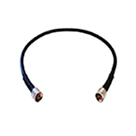
- Mount outside yagi antenna facing your closest cell tower and route Wilson400 cable to amplifier. Connect cable to the port labeled “OUTSIDE ANTENNA”.
- Install inside panel antenna where you need the greatest signal boost and route cable to amplifier. Connect cable to the port labeled “INSIDE ANTENNA”.
- Power up the booster.
We recommend you download the weBoost App to set up the Office 100. It’ll guide you through the whole installation process with easy-to-follow step-by-step instructions and how-to videos. It even helps you measure your existing signal strength and pinpoint your carrier's closest cell tower.
This app has been designed to be downloadable and usable even with very weak signal. If you are having trouble downloading it, refer to the manual included in the box for installation instructions.
Green
Everything is working perfectly. Your signal booster is amplifying at maximum capacity.
Red
Your outside antenna is pulling in signal from your inside antenna instead of the cell tower. This is called a feedback loop or oscillation. Call your installer to get this fixed.
Orange
The outside antenna is pulling in too much signal from the cell tower. To avoid overloading, your amplifier has to shut down. This can be solved with a small adjustment to your outside antenna. Point it slightly away from the cell tower. Do this in small increments. Make sure to power off and power on your booster to ensure the amplifier is updating the light status. Green is a go.
Green & Red (Blinking)
Your outside antenna is pulling in signal from the cell tower AND your inside antenna. Your amplifier still works, but it's operating at reduced power. Call your installer if you see this problem.
Green & Orange (Blinking)
Your outside antenna is pulling in too much signal from the cell tower. It isn't enough to overload the amplifier, but it's operating at reduced power. This can be solved with a small adjustment to your outside antenna. Point it slightly away from the cell tower. Do this in small increments. Make sure to power off and power on your booster to ensure the amplifier is updating the light status. Green is a go.
The booster amplifies the signal reaching your phone at the source, so your phone doesn’t need to “connect” to anything. It isn’t a WiFi router – if your phone can detect cellular signal, then it will pick up the amplified signal the booster emits.
Get the OpenSignal app if you have an iPhone, or the Network Cell Info Lite app for Android, and get reading your signal strength in standard dB (decibel) measurement. The closer to 0 your number, the stronger your signal.
If you decide to return your weBoost Office 100 50 Ohm Yagi/Panel within the 90 day window, simply unplug the amplifier from the cables and email (sales@wilsonamplifiers.ca) or call us (1-800-373-2927). We'd be happy to help with the refund process. We only accept the amplifier and antennas that come with the weBoost Office 100, and none of the cabling or mounting hardware.




 5 Bars
  4-5 Bars
  3-4 Bars
  2-3 Bars
  1-2 Bars
  No Signal